Game development studio

Make the pieces of your game.

Forge brings image, music, sound, video, voice, 3D, world and motion workflows into a React interface backed by a durable render queue. Keep each game’s assets together, inspect local engine health, and connect agents through HTTP and MCP.

Built and tested on NVIDIA RTX Spark native Windows on ARM64

Early-stage The app and queue start without model weights, but rendering needs separately installed models, native engines and, for some adapters, companion applications. A fresh clone is not a one-command AI environment.

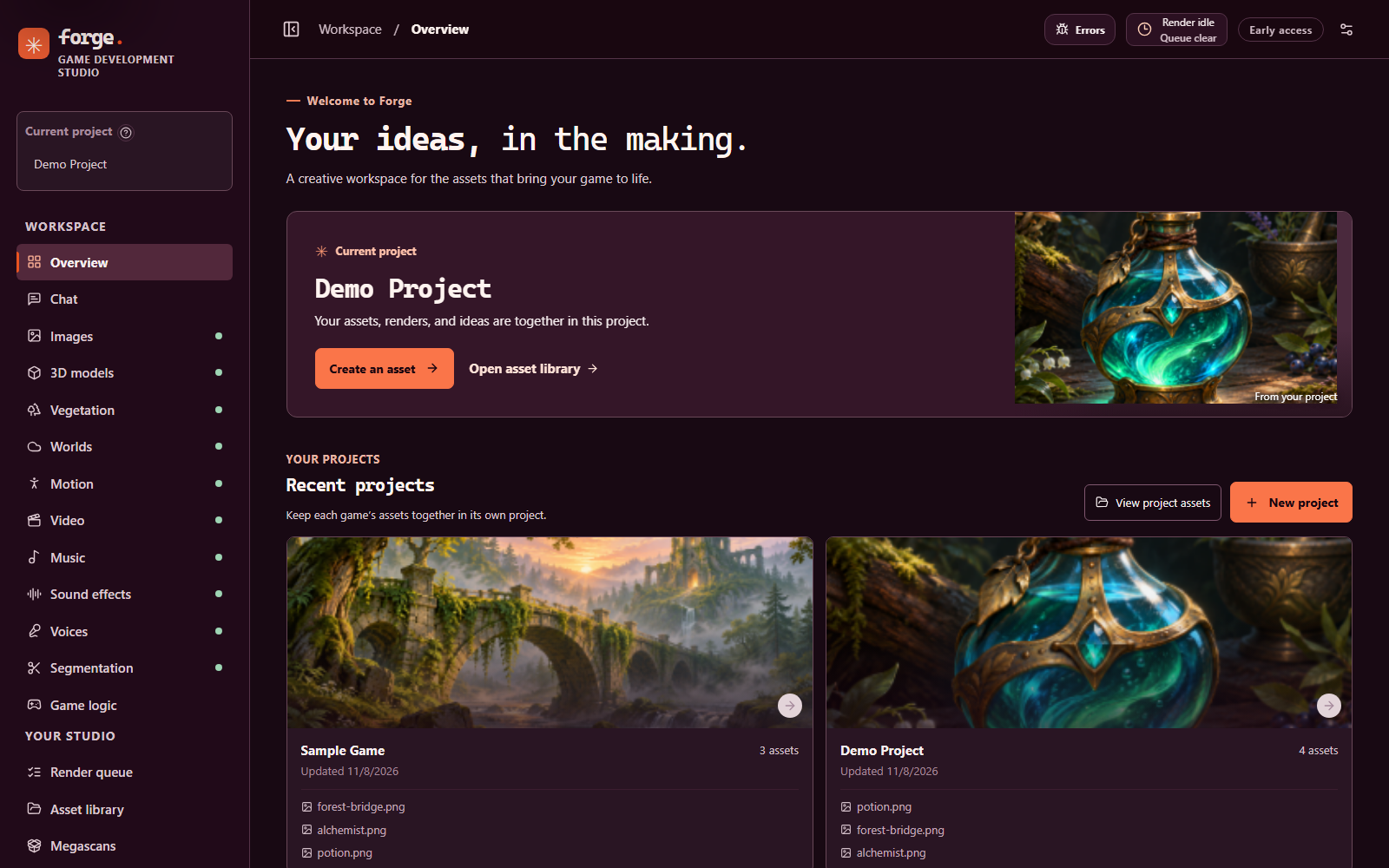
The Forge overview: a sidebar of workspaces, a Demo Project header with sample artwork, and recent project cards on a dark aubergine interface.
The Forge overview with two demo projects and the bundled sample artwork.
  • 17models, plus supporting checkpoints
  • 13engine services on fixed loopback ports
  • 1durable, sequential render queue in SQLite
  • 2026-07-28MCP protocol, over Streamable HTTP or stdio
  • Node 24+React 19 · Vite 6 · Express 5 · Electron
  • MITsource license; models keep their own terms

Hardware

Built on NVIDIA RTX Spark.

Forge is developed and tested on an NVIDIA RTX Spark N1X system: a Blackwell GPU with 6,144 cores and 96 GiB of GPU memory (98,304 MiB as reported by the driver), running Windows 11 on ARM64 natively, with no WSL and no CPU inference. Every Tested status on this page was measured on that one machine, and its memory limits are why Forge loads one model at a time and checks GPU memory before each render.

Other hardware has not been validated to the same level. The figures beside this text are single runs on this machine, not benchmarks. How much the installed model weights add up to, next to this memory, is in Model weight capacity.

  • 96 GiBGPU memory available to the engines
  • 21 sQwen Image 2.1, 1024 × 1024, 12 steps (warm)
  • 70 sTRELLIS.2 textured model, 512 pipeline
  • 20 sHY-Motion, 3 s clip, 50 steps
  • 9 sStable Audio 3, 5 s sound effect

What Forge is

One local studio, many engines.

Forge is an early-stage integration project. It is a project-centred interface for creating, organizing and iterating on game assets, running on your own machine. You create a project, open a workspace, pick compatible project assets as inputs, and add work to one render queue. Results are saved back into the project’s folders.

Behind the interface, a supervised local service starts model engines on demand, checks GPU and system memory before loading or rendering, and keeps engines in isolated processes where supported. The same capabilities are available to scripts over a local HTTP API and to agents over the Model Context Protocol.

Availability varies by model, platform, installed dependencies and granted access. A present file or reachable service does not establish a working GPU render.

Made for

  • Game makers with an NVIDIA GPU who want image, audio, video, 3D, world and motion workflows next to their project files.
  • Agents and scripts that drive the studio through HTTP and MCP tools.
  • Maintainers comfortable restoring native runtimes, Python environments and companion apps.

Not yet for

  • Anyone expecting a one-command, clean-machine AI installer.
  • Model inference on macOS or Linux, which has not been tested.
  • Exposure to an untrusted network: it is a local, loopback service.

A closer look

Projects, panels and a library.

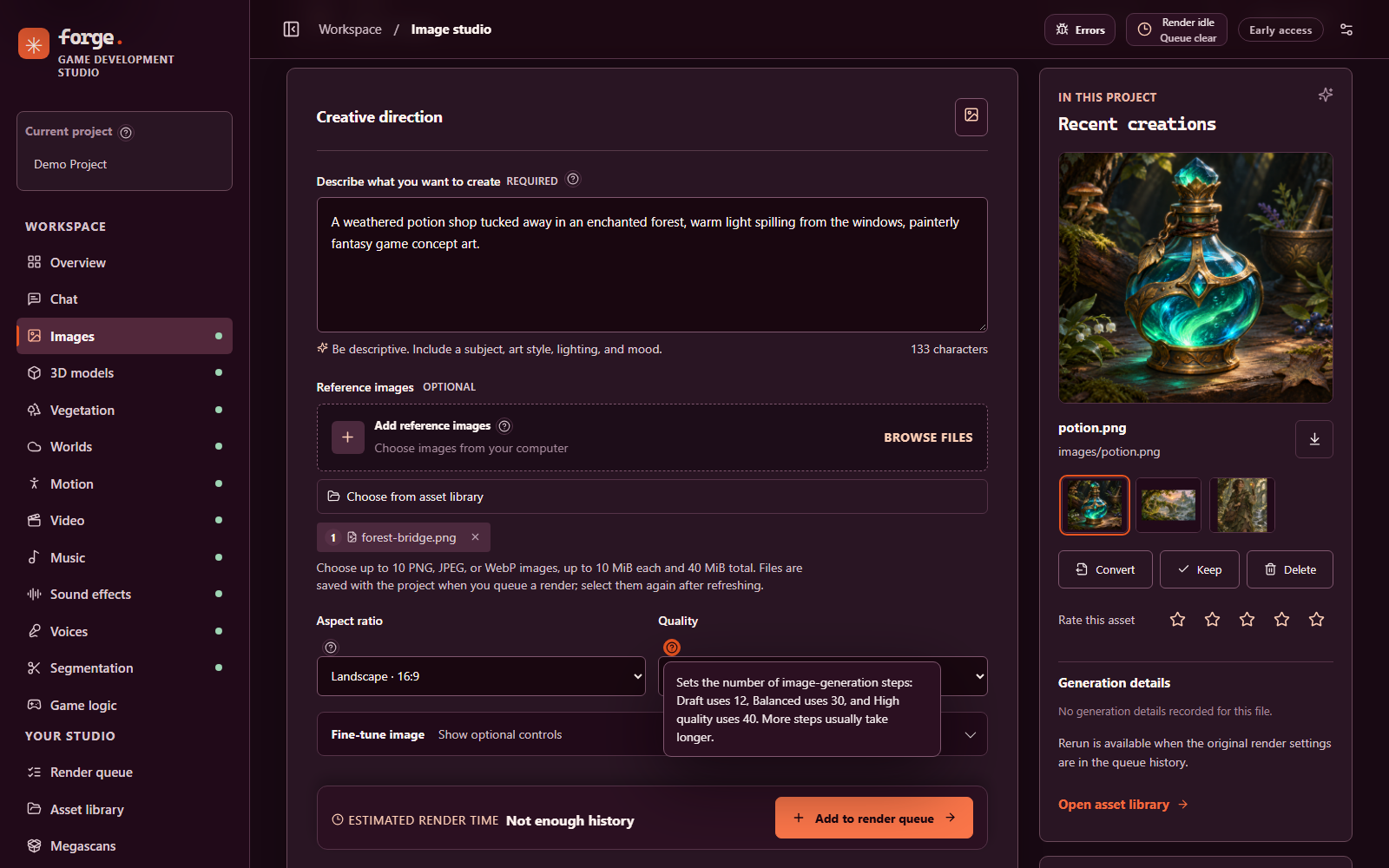
The Image studio: a prompt, a reference image, aspect ratio and quality controls with an inline help popover, an estimated render time bar, and a recent potion artwork.
Create images with project context and a reference image. Field help opens inline, and the estimate bar says “Not enough history” until the project has completed renders to compare.
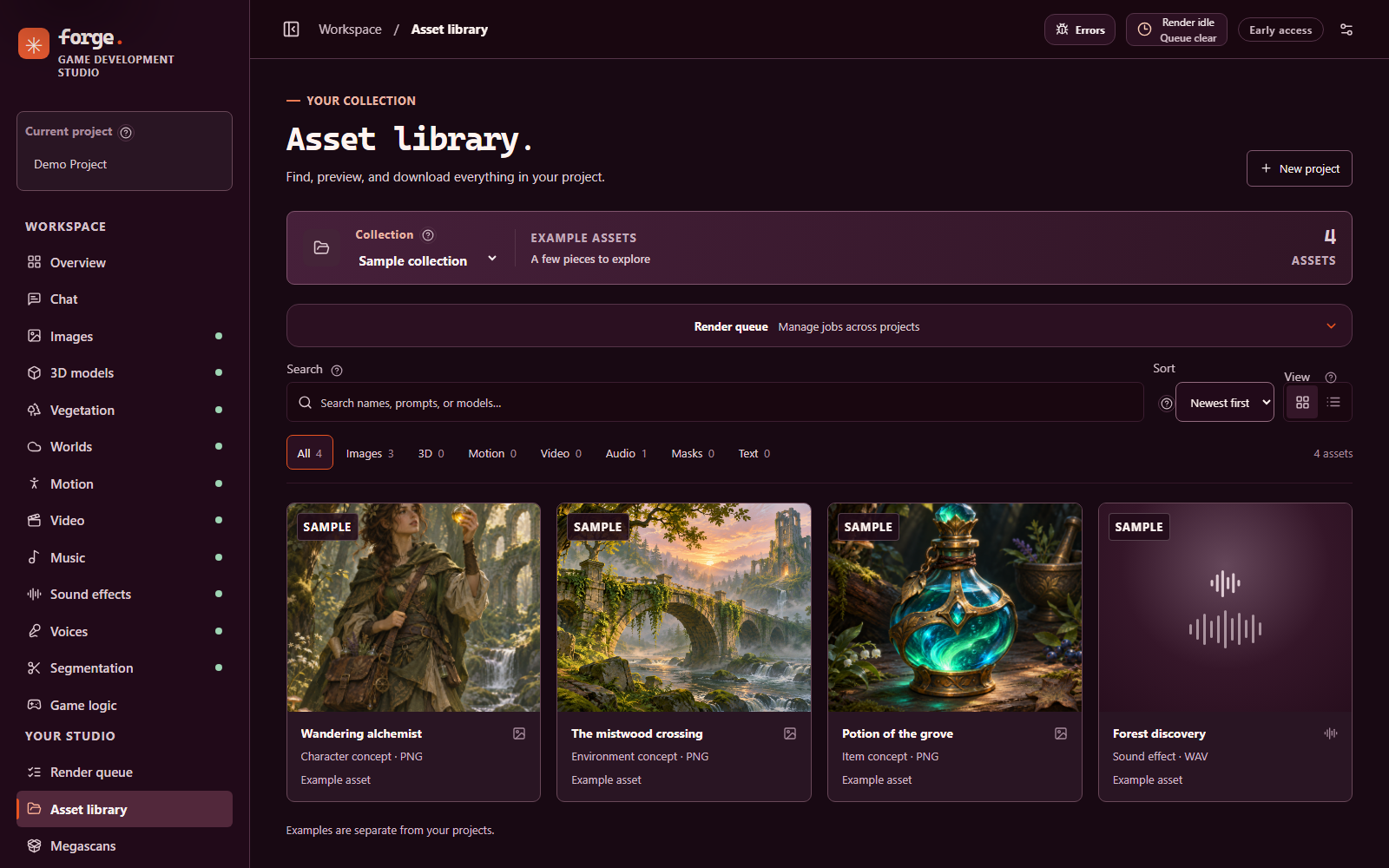
The asset library showing the bundled sample collection: three sample images and a sound effect, with search, type filters, sort and view controls.
Search, filter and preview assets in the library; the screenshot shows the bundled sample collection.

Workspaces

Places to work.

Each panel has its own path (such as /images, /3d, /assets or /models), and Back, Forward and refresh restore the view. In the creation panels, Add to render queue creates a durable job; Save as a draft instead keeps an editable browser draft.

  1. Images

    Generate characters, scenes and game art from a prompt and up to 10 optional reference images, with multi-reference edits, transparent output and variations. Override width, height (multiples of 32) and sampling steps.

    Qwen Image 2.1

  2. 3D models

    Turn a reference image into an untextured GLB shape with Hunyuan3D 2.1, optionally with a PBR texture pass, or make a textured GLB with TRELLIS.2 from a transparent PNG or WebP. Convert results to GLB, glTF, OBJ, PLY or STL.

    Hunyuan3D 2.1 · TRELLIS.2

  3. Worlds

    Generate an environment from text, one image or a 360° panorama with WorldGen (splat PLY or GLB mesh), or reconstruct a Gaussian-splat scene from 1–8 views with HY-World 2.0. Splats open in an interactive preview; panorama meshes have an inside view.

    WorldGen · HY-World 2.0

  4. Character motion

    Text-to-motion as a 30 fps BVH skeleton with HY-Motion 1.0, and keyframe-conditioned transitions between SOMA poses with MotionBricks. Rigging and retargeting are not connected.

    HY-Motion 1.0 · MotionBricks

  5. Video

    Animate 1–9 reference images, with optional reference videos and audio, into short WebM clips. Convert any video to MP4 or GIF. First- and last-frame modes need an optional checkpoint that is not installed.

    MiniMax H3 Ref2VA

  6. Music

    Create music from a style and lyrics (use [Instrumental] for none), extend a track, re-synthesize it with a new seed, or score a melody. Duration, steps, guidance, negative style and title controls.

    YuE2

  7. Sound effects

    Generate sound effects and ambient audio from a prompt. Start from an existing sound to make a variation, replace a region, or continue it. Requires gated model access.

    Stable Audio 3

  8. Voices

    Turn dialogue into speech with Qwen3-TTS preset, designed or cloned voices. Try Fish Audio Drama 3 Q4 for expressive speech. Its CUDA worker and durable queue were tested; subjective audio quality has not been assessed. Transcribe English from a microphone or audio file.

    Qwen3-TTS · Drama 3 Q4 · Nemotron ASR

  9. Segmentation

    Describe an object in a PNG, JPEG or WebP image and save a transparent cutout, mask, outline or cropped image to the project. Choose the best, largest or top-N matches.

    SAM 3.1

  10. Game logic

    Send game state with a choice, score or yes/no questions (several per request) and get a structured decision back for a game character.

    Mammoth-1

  11. Chat

    Streamed conversations with text, JSON or strict JSON-schema replies, sampling controls and thinking levels, with project-scoped browser history. OpenAI-compatible servers also work.

    Qwen3.8-27B

  12. Vegetation

    Grow 20 tree, shrub and cactus species to GLB with SeedThree, on the CPU. Controls come from SeedThree’s own schema, and the design can be saved as a SeedThree preset.

    SeedThree

  13. Megascans

    Browse a cached catalog of free Quixel Megascans 3D models from Fab and download a file into a project, after you accept its licence once.

    Built; live download check pending

  14. Asset library

    Search and filter by generation details, preview, rate, keep, rename and download. Reuse settings queues the same request again. Deletion goes to recoverable project trash. Convert images, audio and 3D models to new copies.

    PNG · JPG · WebP · GIF · WAV · MP3 · FLAC · OGG · MP4 · WebM · GLB · glTF · FBX · BVH · OBJ · PLY · STL

  15. Models & services

    See GPU memory, managed model sizes and observed engine status. Start services, load after a memory check, offload idle workers, force stop, or permanently remove.

    Shared models are protected from removal

  16. Diagnostics

    Server address, port, process ID, Node version and start time; filter, pause and copy live logs from the studio, browser and engines.

    Logs may contain prompts and local paths

  17. Errors review

    Captures browser, queue, server and engine errors with redaction, copy buttons and fingerprints for repeats. An optional GPT fix suggestion and GitHub issues are described under Features.

    Unit and end-to-end tests use fakes

Features

What the studio does now.

Each item carries its state. Tested ran on the real engine or service on this machine. Built is in the app and covered by tests or an isolated copy, but not yet exercised end to end on the real engine. Pending is the open check named in the item. Nothing here is a mock or a disabled control.

Asset metadata and Reuse

Built

Each project keeps generation details for every asset (model, prompt, settings, seed and timings) in its own SQLite database. Search by those details, and use Reuse settings to queue the same request again.

Render queue page

Built

Renders are grouped as Processing, Waiting in line, Needs attention, Failed and Finished. Failed rows can be dismissed. Queue timing shows in the header on every page.

Reordering the waiting line

Built; checked on an isolated copy of the studio

Move a waiting render with Run next, the up and down buttons, or a keyboard-operable drag handle. Running, finished and interrupted renders cannot be moved, and a render that uses another render’s output stays after it.

Queue chaining

Built

A job can wait for an earlier job’s output. For example, remove a background with SAM 3.1 before a 3D render, or generate an image with Qwen Image before a 3D render. Forge places the dependent job right after the one it needs.

One engine at a time

Built

Loads are admitted one engine at a time. Admission checks free GPU memory against each model’s size and refuses ambiguous multi-GPU readings. A finished first model in a chain is unloaded, and a soft host-RAM check warns before a load starves Windows. Each engine has start, load, offload and stop controls.

Interface

Built

Inline help beside parameters, a compact side menu, a mini player (never, once or loop), a 3D viewer, mobile layouts, and hidden engine consoles.

Error review and fix suggestions

Pending real OpenAI and GitHub

Captures browser, queue, server and engine errors, redacts paths and secrets, and groups repeats. A GPT fix suggestion is sent only after you preview the request and choose to send it. GitHub issues are offered only for fixes you mark as working. The flows are unit and end-to-end tested with fakes; they have not yet been exercised with the real OpenAI or GitHub services.

AI assist settings

Built

The OpenAI key is stored encrypted with your Windows account, and each feature has its own model id. The defaults gpt-6.1-sol and gpt-6-luna are names you supplied; they may not exist for your key. Check model asks OpenAI whether the id is valid.

Agents over MCP

Built

An MCP server exposes the queue, assets, asset metadata and models over Streamable HTTP or the stdio bridge. Destructive actions are guarded, and agents are told to ask you first.

Native Windows only

Tested on the target machine

Windows ARM64 with an NVIDIA Blackwell GPU, run natively without WSL. Inference is GPU-only: Forge does not fall back to CPU inference. CPU work is limited to preprocessing and file operations.

Models

Every model, on the record.

Each card is drawn from the shared model catalog (runtime/model-catalog.js), the service list (runtime/catalog.js), the installer manifest (install-models.json) and the model, studio and platform guides. GPU figures are the catalog’s estimates, not reservations or benchmarks. Listing a model does not mean it is installed, running, or verified on your machine.

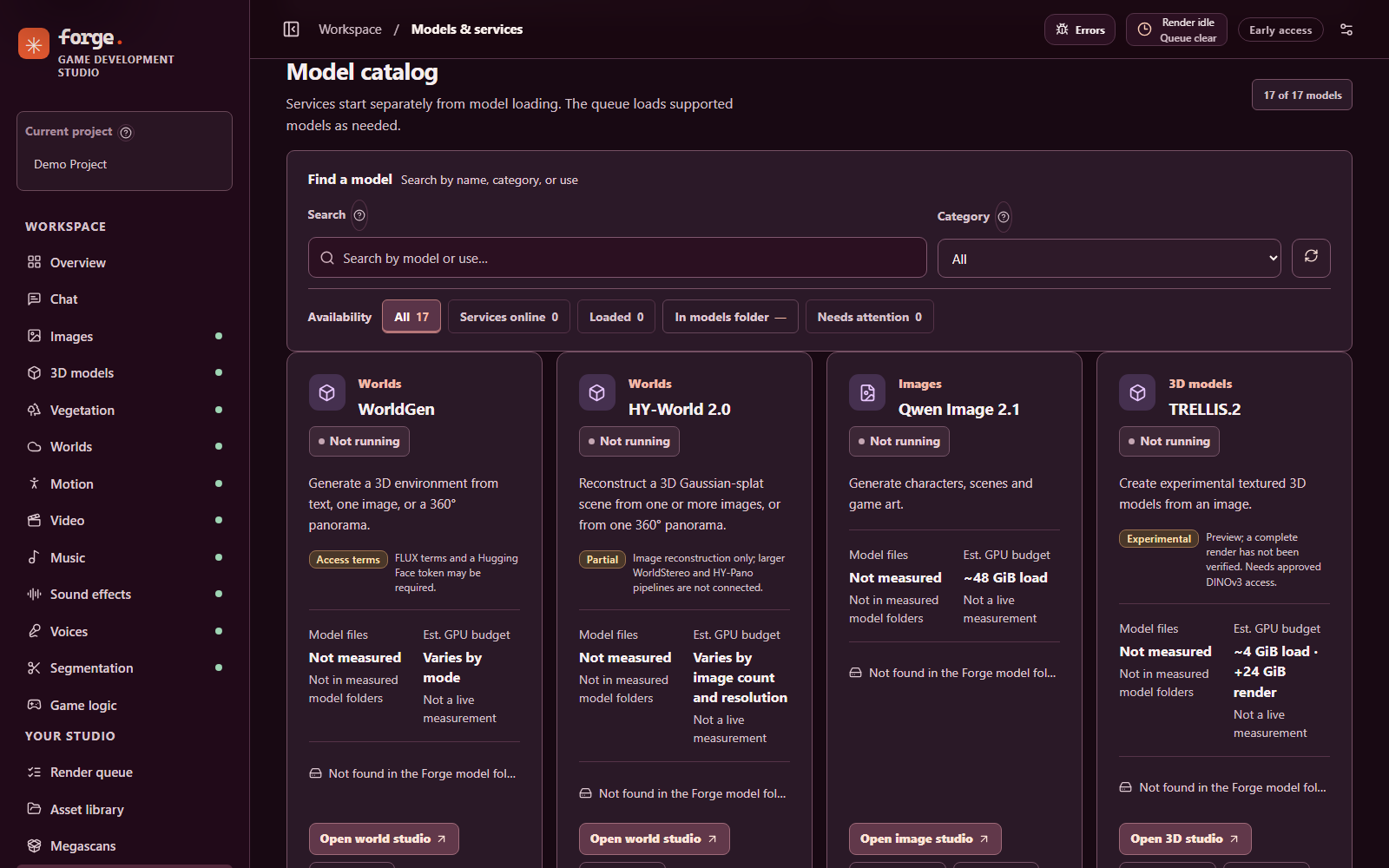
The Models and services catalog showing model cards with category, status, notes, estimated GPU budget and file status.
The in-app catalog on a source checkout with no model weights installed: each card reports its model files as not found, next to its estimated GPU budget and any access or preview notes.
Filter by workspace

18 cards: 17 models and one group of supporting checkpoints.

Tested ran on the real engine on this machine, with the noted limits · Partly experimental tested, with open items or experimental parts · Experimental has unverified behavior or known quality and reliability limits. Listing a model does not mean it is installed or running on your machine.

Images

Qwen Image 2.1

Tested · camera LoRA experimental

Text or image to image: characters, scenes and game art, multi-reference edits, transparent output, variations and an optional LoRA.

In → out
Text prompt, optional reference images (up to 10; 10 MiB each, 40 MiB total) → image
Engine
Qwen Image Studio companion app · :8189
GPU
~48 GiB load — a conservative, uncalibrated working budget plus 2 GiB reserve
License
Not recorded in Forge’s docs; review the model card.
Install
-Models images; needs the Qwen Image Studio environment
MCP
forge_queue_image, forge_stage_reference
Verification & limits
  • One isolated 512×512, 12-step run sampled a peak of 34,900 MiB across all GPU processes; other settings can use more.
  • The camera-angle LoRA fully applies, but its results are experimental.
  • An optional negative prompt enables guidance above 1; real negative-prompt inference has not yet been verified in Forge.
  • The companion downloader follows the repo’s current revision, so it is not a pinned restore.

Sources: model-catalog.js, STUDIO_GUIDE.md, MODEL_SOURCES.md, install-models.json

3D models

Hunyuan3D 2.1

Tested · texture seams experimental

Turn a reference image into a 3D shape, with an optional PBR texture pass.

In → out
Reference image → untextured GLB, or a textured GLB with Paint PBR
Engine
Hunyuan3D shape and texture workers (isolated) · :8283
GPU
~16 GiB load · up to +16 GiB render
License
The installer stages the upstream LICENSE and Notice.txt; review them.
Install
-Models 3d-hunyuan (supports -Activate)
MCP
forge_queue_hunyuan_shape
Verification & limits
  • Shape and VAE checkpoints verified against upstream SHA-256 checksums.
  • Produced a 38,848-vertex untextured GLB from the upstream example image at 30 steps and resolution 128. Resolutions 256 and 384 are experimental.
  • The Paint PBR texture stage ran on the real engine; UV seams remain, so the texture stage is experimental.
  • A Pillow preprocessing fallback replaces OpenCV and has not been shown pixel-identical to upstream.

Sources: model-catalog.js, STUDIO_GUIDE.md, WINDOWS_ARM64.md, MODEL_SOURCES.md, INSTALLATION.md

3D models

TRELLIS.2

Tested

Create textured 3D models from a transparent image.

In → out
Transparent PNG or WebP reference → textured GLB with WebP textures
Engine
TRELLIS.2 worker, native Windows ARM64 port · :8285; pipelines 512, 1024, 1024 cascade and 1536 cascade
GPU
~4 GiB load · +24 GiB render; preparation needs 12 GiB free system memory
Access
Needs the gated DINOv3 encoder (approval required) and a supporting decoder
Install
-Models 3d-trellis, or the pinned, hash-checking downloaders
MCP
forge_queue_trellis
Verification & limits
  • All four pipelines rendered on the real engine on this machine. On one test image, the 512 pipeline took 70 s (43 s when warm), 1024 took 3 min 43 s including its first-use load, the 1024 cascade 4 min 15 s and the 1536 cascade 9 min 10 s.
  • Upstream documents Linux support; this is native Windows ARM64, not upstream Windows support.
  • Upstream’s background-removal model (briaai/RMBG-2.0) returned HTTP 403 for the saved account, so input must already be transparent. SAM 3.1 can prepare it.

Sources: model-catalog.js, STUDIO_GUIDE.md, WINDOWS_ARM64.md, MODEL_SOURCES.md, runtime/README.md

Worlds

WorldGen

Tested

Generate a 3D environment from text, one image, or a 360° panorama.

In → out
Text, image or panorama → Gaussian-splat PLY or GLB mesh
Engine
World generation worker · :8288; process exits after each job
GPU
Varies by mode; not yet calibrated
Upstream
ZiYang-xie/WorldGen · LoRAs · DA-2 depth · FLUX.1 dev / Fill
License
FLUX.1 dev has non-commercial terms; the optional Q5 transformers inherit them. FLUX may require accepting terms and a Hugging Face token.
Install
-Models worldgen stages the two Q5 GGUFs (supports -Activate)
MCP
forge_queue_world
Verification & limits
  • CUDA queue tests completed text-to-splat, image-to-splat and panorama-to-splat/mesh.
  • Scenes are starting points, not guaranteed game-ready geometry: seams, holes and distortion can remain as the viewpoint moves.
  • Without the Q5 files (city96/FLUX.1-dev-gguf, second-state/FLUX.1-Fill-dev-GGUF) the full-precision fallback can demand substantially more Windows commit memory.
  • Forge uses the existing cache offline and does not download missing files during a render. A render guard stops the world process if commit memory becomes critically low.

Sources: model-catalog.js, STUDIO_GUIDE.md, MODEL_SOURCES.md, INSTALLATION.md, install-models.json

Worlds

HY-World 2.0

Tested

Reconstruct a 3D Gaussian-splat scene from one or more images.

In → out
1–8 reference images of the same scene → Gaussian-splat PLY
Engine
World generation worker with the WorldMirror 2.0 weights · :8288
GPU
Varies by image count and resolution
License
Not recorded in Forge’s docs; review the model card.
Install
-Models hy-world; needs the separate Windows compat-port
MCP
forge_queue_world
Verification & limits
  • A four-image reconstruction completed in CUDA queue tests.
  • Only image reconstruction is exposed, not the larger WorldStereo or HY-Pano pipelines.
  • Each render runs in an isolated process with forced CUDA inference; logs appear under Diagnostics → Worlds.

Sources: model-catalog.js, STUDIO_GUIDE.md, MODEL_SOURCES.md, AGENT_SETUP.md

Character motion

HY-Motion 1.0

Tested

Generate human motion from a text description, with variations.

In → out
Text prompt → 30 fps skeletal BVH in the project’s motion/ folder
Engine
HY-Motion worker · :8286
GPU
~26 GiB load · +8–16 GiB render; loading needs 9 GiB free system memory
Upstream
tencent/HY-Motion-1.0 with CLIP ViT-L/14 and Qwen3-8B text encoders
License
The installer stages the upstream LICENSE.txt; review it.
Install
-Models motion-hy (supports -Activate)
MCP
forge_queue_hymotion
Verification & limits
  • Checkpoint and both encoders verified against upstream file hashes.
  • Motion quality has not been assessed beyond the test clips; treat results as drafts to review in the viewer.
  • The queue refuses to load the encoders when free system memory is below the 9 GiB threshold.
  • Automatic rigging and retargeting are not connected.

Sources: model-catalog.js, STUDIO_GUIDE.md, WINDOWS_ARM64.md, MODEL_SOURCES.md

Character motion

NVIDIA MotionBricks

Experimental

Create motion from keyframes: transitions between SOMA poses, with 1–4 target poses.

In → out
SOMA BVH motion, start and target pose windows → BVH motion transition
Engine
MotionBricks SOMA worker, PyTorch graph on CUDA (CPU disabled) · :8287
GPU
~8 GiB load · +3 GiB render (also checks 7 GiB / 4 GiB system memory)
License
Upstream documents separate source and model licenses; the sample-motion license restricts sample poses to evaluation and testing.
Install
-Models motion-bricks (supports -Activate)
MCP
forge_stage_soma_pose, forge_queue_motionbricks
Verification & limits
  • A real isolated Forge queue test produced a SOMA BVH clip on CUDA from NVIDIA’s evaluation-only sample poses; visual quality has not been assessed.
  • No endpoint correction or character retargeting, so transitions can leave gaps at the endpoints. G1 CUDA inference and the ONNX paths are not connected.
  • Input BVH must be Y-up in centimetres, contain the 30 named SOMA joints, use 30, 60 or 120 fps, and stay under 10 MiB.
  • Earlier TensorRT-RTX tests failed with CUDA error 716 and DirectML required CPU fallback, so neither path is enabled.

Sources: model-catalog.js, STUDIO_GUIDE.md, WINDOWS_ARM64.md, MODEL_SOURCES.md

Video

MiniMax H3 Ref2VA

Experimental · not production-ready

Animate reference images, with optional reference videos and audio, into short clips.

In → out
Text prompt, 1–9 reference images (10 MiB each, 40 MiB total), up to 3 reference videos and up to 3 reference audio clips → WebM video (MP4 or GIF by conversion)
Engine
H3 Studio companion app, its own stable-diffusion.cpp on Vulkan, behind a guard · :8274
GPU
~6 GiB render by default; 12 GiB when reference clips are used (H3’s configured VRAM limit plus a reserve)
License
Not recorded in Forge’s docs; review the model card.
Install
-Models video stages diffusion and encoder GGUFs, not the VAEs
MCP
forge_stage_video_reference, forge_queue_video
Verification & limits
  • Tested on the real engine, but intermittent engine crashes made 2 of 6 default renders fail, so it is not production-ready. Retry submits a fresh attempt.
  • Frame counts up to 311 are offered; the 362-frame maximum has not been tested here, because free host RAM fell below 1 GB on a 5-second render.
  • First-frame, last-frame and text-only modes need the separate FL2VA checkpoint, which is not installed, so they are unavailable.
  • The turbo LoRA (4 steps) and the negative-prompt and guidance controls are experimental; whether every tensor of the turbo LoRA applies is unverified.

Sources: model-catalog.js, STUDIO_GUIDE.md, MODEL_SOURCES.md, WINDOWS_ARM64.md, install-models.json

Music

YuE2

Tested

Create music from a style direction and lyrics, extend a track, re-synthesize it with a new seed, or score a melody.

In → out
Style description, lyrics or [Instrumental] → music audio
Engine
YuE2 Studio in the Snapdargon-DJ companion app · :8765
GPU
~24 GiB load (the CUDA pipeline’s budget) plus 2 GiB reserve
Upstream
m-a-p/YuE2-3B · YuE2-Vae · source
License
Review the model’s license terms (not summarized in Forge’s docs).
Install
-Models music; needs the Snapdargon-DJ CUDA environment
MCP
forge_queue_music
Verification & limits
  • The companion service lacks a guarded stop, so it is never offloaded automatically; the memory dialog offers manual choices.
  • Model loads pause later renders until loading finishes or fails; the barrier survives cancellation and restarts.

Sources: model-catalog.js, STUDIO_GUIDE.md, MODEL_SOURCES.md, install-models.json

Sound effects

Stable Audio 3 Medium

Tested · gated access

Generate sound effects and ambient audio, or vary, replace a region of, or continue an existing sound.

In → out
Text prompt with custom duration and steps, optionally with a source sound → sound-effect audio
Engine
Stable Audio Lab companion app · :7863
GPU
~20 GiB load — uncalibrated working budget plus 2 GiB reserve
Access
Gated: approved Hugging Face access required. License terms are on the model card.
Install
-Models sfx; Stable Audio Lab’s downloader builds the Hub cache
MCP
forge_queue_sound
Verification & limits
  • Replace and continue re-render the sound rather than copy it, so the result is new audio.
  • The token is used only by Forge’s own managed sound worker and is not written to the queue, MCP calls or Forge logs.
  • Like YuE2, the companion service is not automatically offloaded.

Sources: model-catalog.js, STUDIO_GUIDE.md, MODEL_SOURCES.md, INSTALLATION.md

Voices

Qwen3-TTS 1.7B

Tested

Turn dialogue into speech with preset voices, a designed voice, or a cloned voice.

In → out
Dialogue text and a voice (one of nine presets, a voice description, or a cloned 3–30 second clip) → completed 24 kHz mono WAV
Engine
Qwen3-TTS worker (12Hz, 1.7B) · :8281
GPU
~12 GiB load · +8 GiB render; clone and design use an 8 GiB working budget
Upstream
Qwen/Qwen3-TTS-12Hz-1.7B-CustomVoice · source. Clone and design use the Base and VoiceDesign checkpoints.
License
Not recorded in Forge’s docs; review the model card.
Install
-Models tts (supports -Activate); clone and design need -Models tts-base or tts-voicedesign
MCP
forge_queue_voice
Verification & limits
  • The same seed, text and settings repeat a preset render bit for bit (checked on this machine). Output is a completed file, not a live stream.
  • Cloning needs the exact words spoken in the clip, typed by you (Forge does not transcribe it), and a confirmation that you have the right to use the voice. Forge copies the clip and records the transcript.
  • Clone and design were rendered on their real checkpoints on 2026-11-08; the clone’s pitch and spectral shape followed its reference clip. That was measured numerically, not judged by ear.
  • The worker holds one checkpoint at a time, so switching between preset, clone and design waits for GPU memory.
  • Its environment shares CUDA libraries from the Snapdargon-DJ runtime, so it is not self-contained.

Sources: model-catalog.js, STUDIO_GUIDE.md, WINDOWS_ARM64.md, MODEL_SOURCES.md

Voices · expressive speech

Fish Audio Drama 3 Q4

CUDA queue tested · quality unassessed

Queue expressive spoken dialogue with direction tags from the Voices page.

In → out
Dialogue and optional expression tags → WAV audio in the project
Engine
Native audio.cpp CUDA process, loaded on demand for each queued render
GPU
Uncalibrated admission estimate; peak GPU memory is not yet measured
License
Fish Audio Community License. Review its commercial and hosted-service conditions.
Install
-Models drama3 stages the Q4 checkpoint; the native CUDA engine is a separate build.
MCP
forge_queue_drama3
Verification & limits
  • A standalone Windows ARM64 CUDA test produced a 4.23-second, non-silent WAV in 61.9 seconds with disk-backed experts and a 2 GiB process working-set cap. That cap is not a GPU memory measurement.
  • An isolated Studio queue test used the real CUDA worker and saved a 4.23-second mono 44.1 kHz WAV with metadata in 79.8 seconds. Its completed state survived reopening the SQLite database. Subjective audio quality has not been assessed.
  • Maximum audio tokens, temperature, top-p and seed are available in the Voices page and MCP tool. Render times need completed matching jobs for estimates.
  • Forge uses disk-backed experts with CPU expert layers disabled. The engine exits after a render; a successful load is not guaranteed by the estimate.

Sources: model-catalog.js, MODEL_SOURCES.md, MCP.md

Voices · speech to text

Nemotron Speech Streaming 0.6B

Tested on files · no live mic test

Transcribe spoken English from audio files.

In → out
Project WAV or uploaded audio → English transcript with word timing and punctuation; four latency modes (80, 160, 560 and 1120 ms)
Engine
NVIDIA NeMo-Speech.cpp 0.3.0, Windows ARM64 CUDA, behind a guard · :8282
GPU
~4 GiB load — uncalibrated, plus 2 GiB reserve
License
Not recorded in Forge’s docs; review the model card.
Install
-Models asr (supports -Activate); runtime installed separately
MCP
forge_load_asr_model, forge_transcribe_project_audio
Verification & limits
  • Model and runtime verified against upstream SHA-256 checksums.
  • Transcription of files was tested. Live microphone transcription has not been tested on this machine.
  • Not automatically restarted after a crash, because a restart needs a fresh GPU check.
  • Files in the UI: up to two minutes and 25 MiB. API: project WAVs up to 32 MiB. MCP transcription is buffered, not realtime.

Sources: model-catalog.js, STUDIO_GUIDE.md, MODEL_SOURCES.md, MCP.md

Segmentation

Meta SAM 3.1

Tested · still images

Select and isolate objects in an image from a text description: cutout, mask, outline or cropped output.

In → out
One PNG, JPEG or WebP image and a text description → transparent PNG, mask, outline or cropped image
Engine
SAM 3.1 worker (isolated) · :8284
GPU
~12 GiB load plus 2 GiB reserve; 9 GiB free system memory
Upstream
facebook/sam3.1 (sam3.1_multiplex.pt) · source
Access
Gated: access approval required.
Install
-Models segmentation (supports -Activate)
MCP
forge_queue_segmentation
Verification & limits
  • Tested on the real engine: a truck in Meta’s example image was isolated and saved as a transparent PNG through MCP and the queue. Quality beyond the tested images is not established.
  • Best, largest and top-N matches can be chosen. Point and box prompts and video tracking are not connected.
  • The Python 3.14 / NumPy 2 environment is outside SAM’s declared NumPy range and remains experimental.

Sources: model-catalog.js, STUDIO_GUIDE.md, WINDOWS_ARM64.md, MODEL_SOURCES.md

Game logic

Mammoth-1

Tested

Structured yes/no, choice and score decisions for game characters.

In → out
Game state and several choice, score or yes/no questions → structured decisions
Engine
Mammoth Studio companion app, or Forge’s guarded worker · :8791
GPU
~24 GiB load plus 2 GiB reserve; 6 GiB free system memory
Upstream
magnitudedev/mammoth-1-GGUF, mammoth-1-Q4_K_M.gguf (16,547,406,624 bytes)
License
Not recorded in Forge’s docs; review the model card.
Install
-Models game; needs the Mammoth Studio environment
MCP
forge_game_decide, forge_load_game_model
Verification & limits
  • A real request through Forge has been verified using the existing external Mammoth decision bridge.
  • The engine refuses a state plus its longest question above 4,096 tokens; Forge does not pre-check the count.
  • A full managed GPU model load has not yet been verified.
  • Never automatically stopped by the queue’s memory manager.

Sources: model-catalog.js, STUDIO_GUIDE.md, MODEL_SOURCES.md

Chat

Qwen3.8-27B

Tested · MTP and image input unverified

Chat and create structured data for your game.

In → out
Chat messages, optional JSON schema → streamed text or structured JSON
Engine
Official llama.cpp b12180 Windows ARM64 CUDA 13.5 server · /api/chat/completions
GPU
~18.75 GiB at 4K context (LM Studio’s offline estimate); admission at 4K needs 21 GiB free system and 21 GiB free GPU memory
License
Not recorded in Forge’s docs; review the model card.
Install
-Models chat; LM Studio is not the inference server
MCP
forge_chat, forge_chat_models, forge_load_chat_model
Verification & limits
  • Image input is being added and is not yet verified. Do not rely on it.
  • MTP speculative decoding is requested at startup; activation and performance have not been verified.
  • Thinking budgets of 256 / 768 / 1536 tokens for low / medium / high on the managed local server.
  • No safe idle-stop guard; Force stop interrupts a response. OpenAI and other compatible providers can be configured separately — a cloud request sends its conversation to that provider.

Sources: model-catalog.js, STUDIO_GUIDE.md, MCP.md, AGENT_SETUP.md, install-models.json

Vegetation · procedural, not neural

SeedThree

Tested on CPU

Grow trees, shrubs and cacti as flat-coloured GLB models.

In → out
Species, seed, triangle budget and controls → GLB and a SeedThree preset; 1–4 variations
Engine
SeedThree generator in a separate Node process · CPU only
GPU
None: no GPU or model memory is used
Upstream
SkyeShark/SeedThree, linked at one pinned commit (0.1.0-alpha)
License
MIT (SeedThree). Linked, not bundled or forked.
Install
Fetch SeedThree on the Vegetation page, or install.ps1 -Vegetation
MCP
Listed in the MCP guide
Verification & limits
  • SeedThree is alpha software. Exports have flat materials only: no textures, wind animation or billboard levels of detail, and opaque leaf quads.
  • Same species, seed and settings give byte-identical files on this machine. This is procedural generation, not a neural model.
  • “Describe it” can send your sentence to OpenAI or the local chat model, only when you choose that provider.

Sources: VEGETATION.md, STUDIO_GUIDE.md, MCP.md

Supporting checkpoints

Encoders, decoders & extras

Dependencies

Files other models rely on. They are not separate studio tools.

  • TRELLIS image decoder — microsoft/TRELLIS-image-large; used by TRELLIS.2.
  • DINOv3 ViT-L/16 — facebook/dinov3-vitl16-pretrain-lvd1689m; image encoder for TRELLIS.2. Access approval required.
  • CLIP ViT-L/14 and Qwen3-8B — text encoders stored under models/HY-Motion/.
  • FLUX.1 components, panorama LoRAs and DA-2 — required by WorldGen and restored with its own scripts.
  • Qwen3-TTS Base and VoiceDesign — optional staged checkpoints for voice cloning and voice design.

Sources: model-catalog.js, MODEL_SOURCES.md, INSTALLATION.md

Revisions, representative SHA-256 hashes and restore commands are in Model sources and restoration. Source repositories and terms can change; review the model card before downloading or using a model.

Model weight capacity

What the weights add up to.

A historical snapshot of installed files on a reference machine, counted and summed from the files themselves. It predates Drama 3 and does not include its weights; your storage requirements and installed models will differ. These figures are measurements, not estimates. tools/model-capacity.mjs writes the figures to model-capacity.json, and this table is drawn from that file.

Measured 2026-11-08: the model weights and supporting files installed on the reference machine, an NVIDIA RTX Spark N1X with 96 GiB of GPU memory, summed from the files in Forge’s models folder. This counts files and bytes. It is not a benchmark, a parameter count or a loaded-memory figure.

  • Models counted1615 with weights on disk; SeedThree has none
  • Total on disk363.70 GiB390.52 GB in 22 entries
  • Model weights298.39 GiB65.31 GiB more in supporting checkpoints and caches
  • Largest modelHY-World 2.071.59 GiB, 19.7% of the total
  • Weights vs GPU memory3.1×model weights on disk ÷ 96 GiB of GPU memory

The model weights alone (298.39 GiB) are about 3.1 times the 96 GiB of GPU memory, which is why Forge loads one model at a time. This compares file sizes on disk with memory capacity: it does not say how much GPU memory a loaded model uses, and Forge does not record loaded sizes here.

Size on disk of each model and its supporting files, measured 2026-11-08

ModelAreaSize on disk (GiB)Share of totalKind
HY-World 2.0Worlds71.5919.7%Model weights
MiniMax H3 Ref2VAIncludes its LoRAs and VAEs.Video68.9719.0%Model weights
Shared Hugging Face cacheHolds the FLUX.1 dev and Fill components, DA-2 and the WorldGen LoRAs.Worlds55.5915.3%Cache
Qwen Image 2.1Includes the folder for image LoRAs.Images31.168.6%Model weights
HY-Motion 1.0Includes the CLIP ViT-L/14 and Qwen3-8B text encoders stored in the same folder.Character motion20.755.7%Model weights
Hunyuan3D 2.13D models17.004.7%Model weights
Qwen3.8-27BA quantized GGUF file.Chat16.524.5%Model weights
WorldGenThe two Q5 transformers; the FLUX.1 components live in the shared cache.Worlds15.534.3%Model weights
Mammoth-1Game logic15.434.2%Model weights
TRELLIS.2Its decoder and DINOv3 encoder are listed separately as supporting checkpoints.3D models13.803.8%Model weights
Stable Audio 3 MediumSound effects9.732.7%Model weights
YuE2The YuE2-3B model and the YuE2-Vae decoder.Music7.292.0%Model weights
Qwen3-TTS BaseOptional checkpoint for voice cloning.Voices4.231.2%Supporting checkpoint
Qwen3-TTS 1.7BThe preset-voice checkpoint; Base and VoiceDesign are listed separately.Voices4.211.2%Model weights
Qwen3-TTS VoiceDesignOptional checkpoint for designing a voice from a description.Voices4.211.2%Supporting checkpoint
Meta SAM 3.1Segmentation3.260.9%Model weights
NVIDIA MotionBricksCharacter motion2.490.7%Model weights
DINOv3 ViT-L/16 encoderUsed by TRELLIS.2.3D models1.130.3%Supporting checkpoint
Nemotron Speech Streaming 0.6BVoices0.650.2%Model weights
TRELLIS image decoderUsed by TRELLIS.2.3D models0.14<0.1%Supporting checkpoint
ComfyUI companion filesLoRA and preview files. A file it shares with MiniMax H3 is counted under H3.Video0.01<0.1%Supporting checkpoint
SeedThreeRuns on the CPU and has no model weights.Vegetation0.000.0%Model weights
Total (22 entries)363.70100.0%390.52 GB

Measured 2026-11-08 on NVIDIA RTX Spark N1X; sizes are on-disk bytes, not parameter counts. GiB = 1,024³ bytes; GB = 1,000³ bytes. Each row is rounded on its own, so the rows can differ from the total by a few hundredths of a GiB.

How this was measured

Sizes were measured on 2026-11-08 by tools/model-capacity.mjs. It walks every folder under the checkout’s models folder without following links, adds up the size of each regular file, and assigns each folder to one row of the table through a mapping written in the script. The script fails when a folder over 100 MiB is not mapped, so a new model cannot be left out. Sizes are file sizes, so they exclude filesystem overhead and are not parameter counts.

NTFS can give one file several names (hard links). Each such file is counted once, in the model row that owns it. Forge’s Models page and its storage scan add up every name, so they can report more bytes than the files really occupy.

The running studio’s own storage scan reported 381.48 GiB for the same models folder; this table totals 363.70 GiB. The difference is 18.08 GiB of hard-linked names that the studio scan counts twice, offset by 0.30 GiB in a folder the studio scan does not cover (no bytes are left unexplained).

3 of the counted files (9.85 GiB) also have hard links outside the models folder. They are counted here, but deleting them from the models folder would not free that space.

Not measured: parameter counts, compressed size, GPU memory used by a loaded model, or duplicate content stored as separate copies.

Architecture

Supervised, isolated, local.

server.js supervises an HTTP host in a separate process. That host supervises a runtime process that runs the durable SQLite queue and a GPU-monitor worker thread. Engine processes are isolated from the HTTP and queue processes, and the main supervisor keeps handles to the engines it started, so an HTTP-host restart does not give up ownership.

Forge architecture The browser UI and the Electron desktop window talk to the local Studio service at 127.0.0.1:5173. Agents connect over Streamable HTTP MCP at /mcp, or through the stdio bridge runtime/mcp.js, which calls the same HTTP API. Inside the service, the server.js parent supervisor runs the HTTP host, which supervises the runtime process holding the durable SQLite queue and GPU monitor. The engine broker handles memory admission, start, load and ownership for isolated engine processes on fixed loopback ports. Models, projects and runtime state live in models/, projects/ and .forge-runtime/. CLIENTS React UI in your browser Desktop window Electron + Windows tray Agent MCP client, 2026-07-28 stdio bridge runtime/mcp.js STUDIO SERVICE · 127.0.0.1:5173 Parent supervisor server.js HTTP host React app · HTTP API Streamable HTTP MCP at /mcp Runtime process Durable SQLite render queue GPU-monitor worker thread Engine broker Memory admission · start / load Ownership · safe stop · force stop ISOLATED ENGINES · LOOPBACK ONLY Qwen Image :8189 YuE2 :8765 Stable Audio :7863 H3 video :8274 Worlds :8288 Mammoth-1 :8791 TRELLIS.2 :8285 Hunyuan3D :8283 HY-Motion :8286 MotionBricks :8287 Qwen3-TTS :8281 Nemotron ASR :8282 SAM 3.1 :8284 llama.cpp chat Some engines bridge companion apps: Qwen Image Studio, Snapdargon-DJ, Stable Audio Lab, H3 Studio, Mammoth Studio LOCAL STATE · IGNORED BY GIT projects/ your assets .forge-runtime/ queue · logs models/ checkpoints or
How a request flows: clients and agents reach one loopback service; the queue hands work to the engine broker, which starts or loads isolated engines after a memory check.

Engine pattern

A Python backend loads and runs the model, a worker owns the local HTTP service and busy state, preparation code checks resources and starts or loads it, and a job adapter moves inputs and outputs through the durable queue. Existing companion apps keep their own APIs.

Process recovery

HTTP and runtime supervisors retry failed starts with backoff. Unexpected exits of services started by the current runtime are retried up to three times, without automatic model loading. On Windows, a restarted supervisor can re-adopt a verified TRELLIS.2 worker; other engines are not yet adopted this way.

Honest status

A port answering is not proof of the expected engine. Forge checks each status response against the engine it expects before reporting it reachable; otherwise the service is shown as unverified or unavailable.

Render queue

One queue that remembers.

Image, music, sound-effect, video, voice, Hunyuan shape, SAM segmentation, HY-Motion and MotionBricks jobs (plus TRELLIS.2 and world renders) run sequentially and are stored in .forge-runtime/jobs.sqlite. Queue leases and accepted remote IDs keep a crash from silently submitting duplicate work.

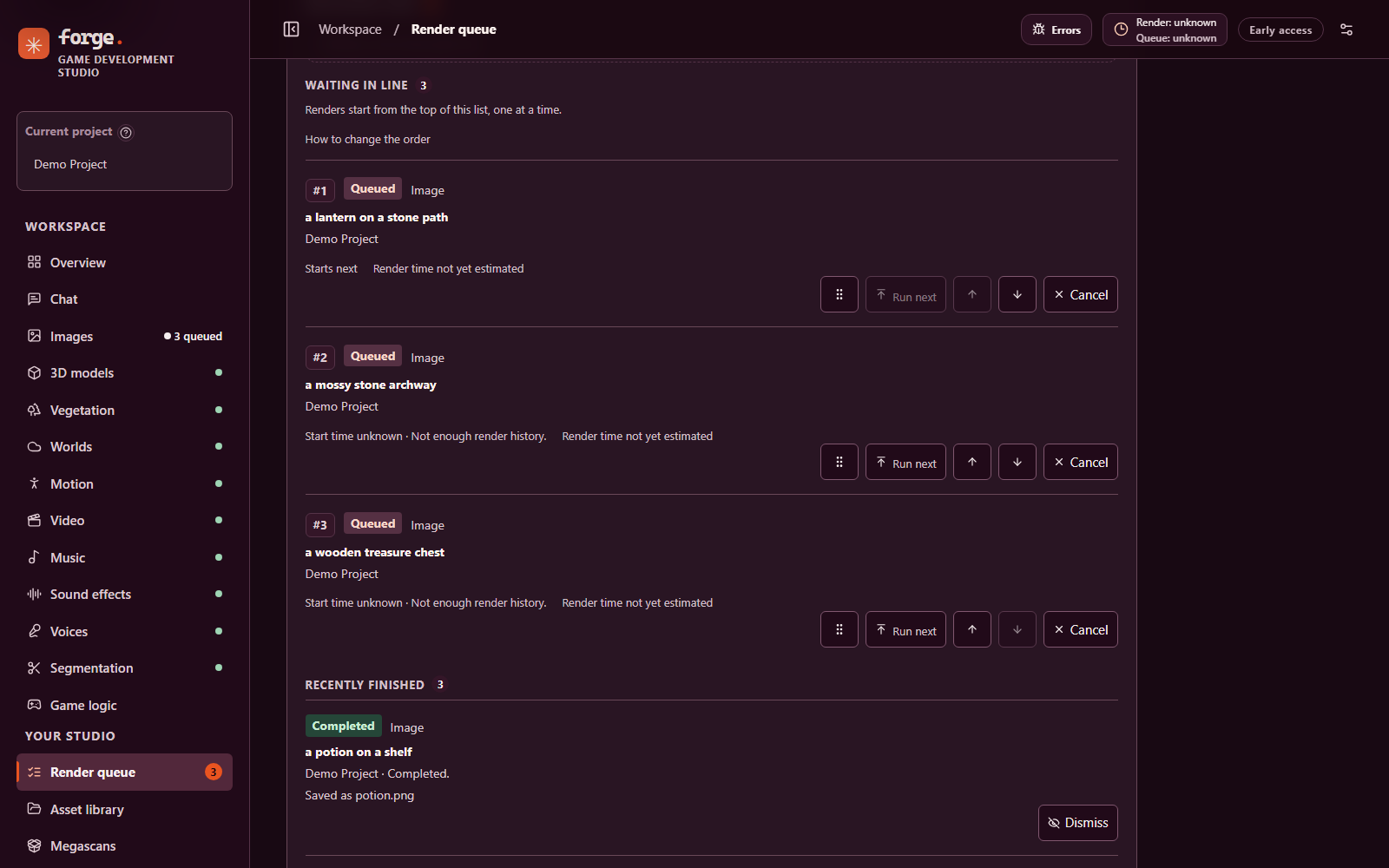
The render queue listing three waiting image renders with drag, run next, move up, move down and cancel controls, above a recently finished render.
Waiting renders in order, with controls to reorder or cancel each one. The rows are demo entries from an isolated copy with no engine running, so nothing was rendered.
  1. 01

    Queued

    Waiting jobs can be cancelled. Image, video and BVH inputs are snapshotted into the project for recovery and retries.

  2. 02

    Preparing

    The engine starts on demand; GPU and system memory are checked before loading. If short, Forge may stop one verified idle, Forge-managed worker, then re-check.

  3. 03

    Accepted

    The engine accepts the job and its remote ID is recorded. Render timing starts here.

  4. 04

    Saved

    Output is written atomically to the project’s matching asset folder, with render history kept for reruns and refinement.

Interrupted

If a crash makes a submission uncertain, the queue stops on an interrupted item instead of resubmitting. Check the engine’s own queue and history, then resolve it. Later jobs wait until you do.

Survives restarts

A job with a known remote ID resumes monitoring after a runtime restart. Completed files from the Hunyuan3D, SAM, HY-Motion, MotionBricks and Qwen3-TTS workers can be recovered without reloading the model. Model-load barriers persist too.

Retries reuse work

Retrying a failed job with a known engine job ID rechecks that job rather than rendering again. Submit a new request with a different seed for a new variation. Running jobs cannot yet be cancelled from Forge.

Estimates, labelled

Exact estimates use completed jobs with matching settings; nearby settings give a result marked rough. Without suitable history the studio says the time is unknown instead of inventing one.

Data & storage

Your files stay on disk.

These directories, installed dependencies and native binaries are ignored by Git. Back up projects/ and any runtime state you need separately from the source repository.

projects/

projects/
└── Your Game/
    ├── .forge-project.json
    ├── images/
    ├── video/
    ├── music/
    ├── sfx/
    ├── voices/
    ├── 3d/
    ├── motion/
    ├── text/
    └── masks/

Created per project with sanitized names. Generated motion goes to motion/ and saved transcripts, chat replies and decisions to text/. Hidden .forge-inputs and .forge-thumbnails hold reference snapshots and cached thumbnails.

.forge-runtime/

.forge-runtime/
├── jobs.sqlite
├── runtime-worker.log
├── engine-chat.log
├── credentials/
│   └── keys.sqlite
└── …engine environments

Launcher state, server logs, the persistent queue database, notification preferences and DPAPI-encrypted API keys. Keep it if you need queue history.

models/

models/
├── Qwen-Image-2.1/
├── Hunyuan3D-2.1/
├── TRELLIS.2-4B/
├── HY-Motion/
├── sam3.1/
├── worldgen/
└── …

The canonical model directory. Some standalone apps reach the same files through compatibility links, and shared models are protected from Studio removal until their consumers can be coordinated.

Drafts, the selected project, notification preferences and sample ratings live in browser local storage, so switching browsers or ports can make them unavailable.

API & MCP

Built for people and agents.

Forge provides local HTTP APIs and MCP tools for model discovery, project and asset operations, queue control and supported creation workflows. The same MCP tools are served over Streamable HTTP at http://127.0.0.1:5173/mcp and through the stdio bridge in runtime/mcp.js; both use one shared tool registry and require the 2026-07-28 MCP protocol. Older handshakes are rejected.

GET /api/models returns the shared model catalog: each model’s purpose, inputs, outputs, engine, related MCP tools and the latest service and storage observations. If the runtime is unavailable, the static catalog is still returned with runtimeAvailable: false.

PowerShell · model catalog
Invoke-RestMethod 'http://127.0.0.1:5173/api/models'
Start the stdio bridge (Studio must be running)
npm run mcp
MCP client config · stdio
{
  "mcpServers": {
    "forge": {
      "command": "node",
      "args": ["C:\\path\\to\\Game Development Studio\\runtime\\mcp.js"],
      "env": { "FORGE_STUDIO_URL": "http://127.0.0.1:5173" }
    }
  }
}

API calls and tests using substitute workers do not prove that a real model can render on a particular machine. Use the client’s tools/list for current schemas.

MCP tool groups
Task Tools
Discover forge_models forge_services forge_hardware forge_model_storage
Projects forge_create_project forge_projects
Assets forge_read_text_asset forge_view_thumbnail forge_update_asset forge_rename_asset forge_trash_asset forge_restore_asset forge_convert_asset forge_save_text_asset
Generate forge_stage_reference forge_stage_soma_pose forge_queue_*
Queue forge_jobs forge_job forge_estimate_render forge_estimate_queue forge_cancel_queued_job forge_move_job forge_retry_job forge_resolve_interrupted_job
Models forge_start_engines forge_load_* forge_offload_model forge_close_model forge_force_stop_model forge_remove_managed_model
Chat forge_chat_models forge_estimate_chat_memory forge_load_chat_model forge_chat
Speech & games forge_queue_voice forge_queue_drama3 forge_transcribe_project_audio forge_game_decide
Diagnose forge_diagnostics forge_logs forge_runtime_health forge_power_status forge_set_keep_awake
A few HTTP endpoints
Endpoint Purpose
GET /api/models Shared model catalog with observations
GET /api/diagnostics Server metadata and service reachability
GET /api/logs/stream Live logs as server-sent events
GET /api/runtime/hardware NVIDIA GPU memory snapshot, project volume free space
POST /api/runtime/jobs Queue a supported render job
POST /api/runtime/estimate Estimate a render from completed jobs
POST /api/runtime/game/decide Structured decision from Mammoth-1
WS /api/asr/realtime Live PCM16 transcription

Force stop needs a literal confirmation; permanent model deletion and emptying project trash need their own. Agents should ask the user before destructive actions.

Requirements

Where it runs today.

Platform support, as documented
Platform Status Notes
Windows ARM64 + NVIDIA GPU Targeted The observed installation was assembled on an NVIDIA RTX Spark N1X, natively, without WSL. Inference is GPU-only: Forge does not fall back to CPU inference.
Other Windows hardware Not validated Other platforms and hardware have not been validated to the same level.
macOS and Linux Unverified Shell launchers are syntax checked, but model integration has not been verified end to end. Keep-awake is Windows-only.
Multiple GPUs Refused Memory admission needs a single identifiable NVIDIA GPU and refuses ambiguous multi-GPU readings.

You will need

  • Node.js 24 or later and npm (pnpm is a supported alternative).
  • An NVIDIA GPU and compatible driver. Memory and storage needs depend on the model and settings; model files and working memory can each take many gigabytes.
  • Enough free Windows commit memory as well as GPU memory — they are separate measurements.
  • Model weights, native runtimes, credentials and companion apps, installed separately. Some model repositories require access approval.

Install

Two layers, installed deliberately.

Forge has a web app and local model engines. The installer sets up the web app and can download selected model files, but several engines still depend on separate Windows applications, native CUDA packages or Python environments. Run these from PowerShell in the cloned repository.

  1. Inspect first — nothing is downloaded

    -CheckOnly reports prerequisites without changing them; -ListModels lists every model ID, source and location; -Plan prints intended downloads.

    powershell -NoProfile -ExecutionPolicy Bypass -File .\install.ps1 -CheckOnly
    powershell -NoProfile -ExecutionPolicy Bypass -File .\install.ps1 -ListModels
    powershell -NoProfile -ExecutionPolicy Bypass -File .\install.ps1 -Plan -Models worldgen,hy-world
  2. Install and launch the web app

    The installer runs npm ci when node_modules is missing, then builds. The app can start with no model files.

    powershell -NoProfile -ExecutionPolicy Bypass -File .\install.ps1
    powershell -NoProfile -ExecutionPolicy Bypass -File .\start-server.ps1

    Open http://127.0.0.1:5173, or run start-desktop.cmd for the desktop window. Starting the studio does not load model weights.

  3. Download only the models you need

    Install the Hugging Face CLI, request access for gated models and sign in with hf auth login. Never put tokens in a command or repository file. Downloads go to a new staging folder; no existing model is changed.

    # Preview the exact sources first.
    .\install.ps1 -SkipApp -Plan -Models asr,tts
    
    # Download to a new, separate staging folder.
    .\install.ps1 -SkipApp -Models asr,tts
    
    # Or install supported model folders after staging and checks.
    .\install.ps1 -SkipApp -Models asr,tts -Activate

    -Activate is available for worldgen, 3d-hunyuan, motion-hy, motion-bricks, tts, drama3, asr and segmentation. It installs model files only and refuses to replace an existing target.

  4. Restore each engine’s environment

    Python environments, companion apps and native runtimes are separate dependencies. Follow the installation guide, model sources and Windows ARM64 notes.

  5. Verify, one small render at a time

    Open Models & services and Diagnostics. A reachable service or present file does not prove a model is loaded; run one small render per installed workflow and inspect the asset.

    powershell -NoProfile -ExecutionPolicy Bypass -File .\stop-server.ps1
    # Port 5173 busy? Use the same port to start and stop.
    powershell -NoProfile -ExecutionPolicy Bypass -File .\start-server.ps1 -Port 5199

Security & privacy

Local by default.

  • Loopback only

    The unified service binds to 127.0.0.1. Engine addresses are fixed to loopback, and a configured engine URL must be a local HTTP origin. It is not a production authentication or remote-access system.

  • Encrypted API keys

    OpenAI and Hugging Face keys saved in Studio settings are encrypted with the Windows Data Protection API under the current user, stored in a local SQLite database, and never returned to the browser.

  • Tokens stay out of logs

    Keys and tokens are passed to helpers over stdin rather than on command lines, and are not written to queue state, MCP calls or Forge logs. Never put an API key in MCP arguments.

  • Review logs before sharing

    Known secret patterns are redacted on a best-effort basis in the API and UI, but logs can still contain prompts and local paths. The raw log file is not redacted.

  • Your microphone, locally

    Microphone access is requested only when you start recording and released on stop. Audio is sent only to the local speech service.

  • Cloud is opt-in

    A cloud chat request sends its conversation to that provider. Prompts, credentials and uploaded files are never placed in shareable URLs.

Other processes running as your Windows user can potentially use that user’s credentials. Review the security implications before exposing the server to another machine.

Development & quality

Test the right layer.

PowerShell
npm ci
npm run dev                 # Vite development server
npm test                    # JavaScript tests
npm run build               # Production frontend build
npm run lint                # ESLint
npm run format:check        # Prettier

Python checks use Ruff in a separate .venv-dev environment (Python 3.12) so developer tools never land in a model’s environment.

The JavaScript suite (node --test) covers queue persistence and recovery, lease fencing, model-load barriers, GPU-memory admission, worker protocols, project assets and trash, model inventory and removal, HTTP, and MCP.

A native TRELLIS component suite checks CuMesh, FlexGEMM, O-Voxel, nvdiffrast, OpenCV preprocessing and sparse SDPA on small inputs. Separate real-model checks load gigabytes of weights; none of them generates a complete TRELLIS.2 asset.

Tests that use fake engines establish protocol behaviour; they do not prove real GPU generation or visual and audio quality. ESLint and Ruff don’t verify inference, security, accessibility or output quality either.

Built with React 19, Vite 6, Express 5, three.js, Electron, the MCP TypeScript SDK and zod, with Lucide icons.

License

MIT, with care for upstream.

Forge source code is available under the MIT License. Model weights, companion applications, third-party dependencies and their example assets have their own licenses and access terms; the MIT license does not replace them.

  • FLUX.1 dev — and the Q5 transformers WorldGen can use — carry non-commercial terms.
  • MotionBricks has separate source and model licenses; its sample poses are for evaluation and testing only.
  • Stable Audio 3, SAM 3.1 and DINOv3 are gated and require approved access.
  • Fish Audio Drama 3 uses the Fish Audio Community License, with separate commercial and hosted-service conditions.
  • Megascans downloads from Fab are subject to Fab’s terms and each listing’s licence. You accept them in the studio before any download.
  • SeedThree (vegetation) is MIT-licensed; it is linked, not bundled.

FAQ

Straight answers.

Can I download Megascans models?

The portal can browse a cached catalog and download a file into a project after you accept Fab’s terms and the listing’s licence yourself. The download path is built, but a live download through the new code is still pending a check.

Does vegetation need a GPU?

No. SeedThree runs on the CPU and makes flat-coloured GLB models. It is procedural generation, not a neural model, and it has no textures or wind animation.

Is MiniMax H3 video reliable enough to rely on?

No. It rendered on the real engine, but intermittent engine crashes failed 2 of 6 default renders, so it is experimental. Retry submits a fresh attempt.

Will cloning the repository give me working AI models?

No. A fresh clone can run the web application after JavaScript dependencies are installed, but it cannot reproduce the local inference stack by itself. Weights, native runtimes, Python environments and some companion apps are installed separately.

Does it work on macOS or Linux?

Shell launchers are included and syntax checked, but macOS and Linux model integration has not been verified end to end. The local GPU integrations are Windows-specific and not automatically portable.

Is TRELLIS.2 ready to use?

Yes, for the tested workflows. All four pipelines (512, 1024, 1024 cascade and 1536 cascade) rendered on the real engine on this machine and produced textured GLB files with WebP textures. It runs as a native Windows ARM64 port; upstream documents Linux support only.

Can it rig or retarget my characters?

No. HY-Motion and MotionBricks produce BVH motion and are experimental; automatic character rigging and retargeting are not connected.

Can I clone a voice?

Yes, with a 3–30 second clip and your confirmation that you have the right to use the voice. You type the exact words spoken in the clip; Forge does not transcribe it and records the transcript, not the audio. Cloning and designed voices use optional checkpoints that are staged separately.

What happens if the studio crashes mid-render?

Jobs with a known remote ID resume monitoring after restart, and some workers’ completed files can be recovered. If the submission is uncertain, the job is marked interrupted and blocks the queue until you check the engine and resolve it, so work isn’t silently duplicated.

Will a render download missing model files?

No. Forge does not download missing model files during a render. Downloads happen only when you run the installer or a documented downloader deliberately.

How much GPU memory do I need?

It depends on the model. The catalog lists estimates, from about 4 GiB to load Nemotron ASR up to a conservative ~48 GiB budget for Qwen Image 2.1. These are uncalibrated estimates and snapshots, not reservations; Windows commit memory matters too.

Can I reach it from another computer?

It is intended for use on the same computer and binds to loopback. Do not expose the development server to an untrusted network; it is not a remote-access system.

Can an agent delete my files?

Deleted project assets go to recoverable trash. Permanent model deletion, emptying project trash and force stop each need their own explicit confirmation, and the MCP guide tells agents to ask the user before destructive actions.

Roadmap

Planned, not built.

These entries are planned integrations. None is available in Forge, and none has been run on this machine. Each lists its main open question, as recorded in the roadmap guide.

OmniSVG

Text and image to SVG. Not started

Open: whether its CairoSVG and native Cairo dependencies install on Windows ARM64, and which weights to ship as the default.

AVTR-1

Talking and listening portrait avatars. Not started

Open: the renderer and streamer use a noncommercial licence, and the stack is Linux-first; Windows ARM64 feasibility is unknown.

MoCapAnything V2

Video to BVH motion for arbitrary skeletons. Not started

Open: whether it runs natively on Windows ARM64, and which rigs fail, as the authors note.

UniMate

Text to animation for any rig. Not started

Open: whether its dependencies install natively on Windows ARM64, and the weights licence.

Pixal3D

Pixel-aligned 3D from one or several images, on the TRELLIS.2 backbone. Not started

Open: whether it runs natively on Windows ARM64, and whether the natten dependency builds for the Blackwell GPU.

ACE-Step 1.5

Fast local music generation, cover, repaint and stems. Not started

Open: whether it replaces YuE2 or sits beside it, the weights licence, and whether it installs on Windows ARM64.

VOSR and FiDeSR

Diffusion super-resolution upscalers for images and textures. Not started

Open: which candidate suits game art, the weights licences (FiDeSR’s is missing), and the main risk: torch 2.0.1 and xformers 0.0.20 predate the Blackwell GPU.